

Slow play? Not today.
What is TractGolf?
TractGolf connects every golfer and marshal on your course in real time. Rounds keep moving, players stay safe, and your team always knows exactly what is happening out on the course.
For golfers
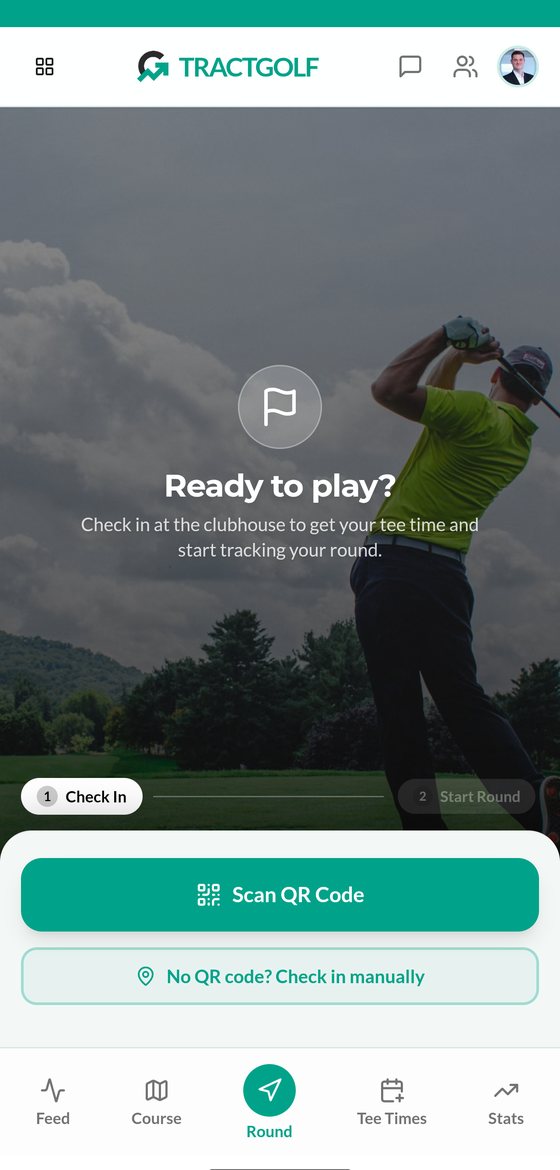
Golfers use the player app on their own phone. They check in by scanning a QR code at the clubhouse. From then on, the app shows where they are on the course, how far ahead the next group is, and lets them message the marshal.
If they want to, they can also book tee times, keep score and track their stats.
For marshals
Marshals use the marshal app in a web browser. It shows every checked-in group on a live map of the course, highlights any group that is falling behind, and lets staff message players or step in before a queue builds up.
The result is less waiting on the tee, fewer balls landing near the group in front, and a course team that can see what is happening without driving out to find it.
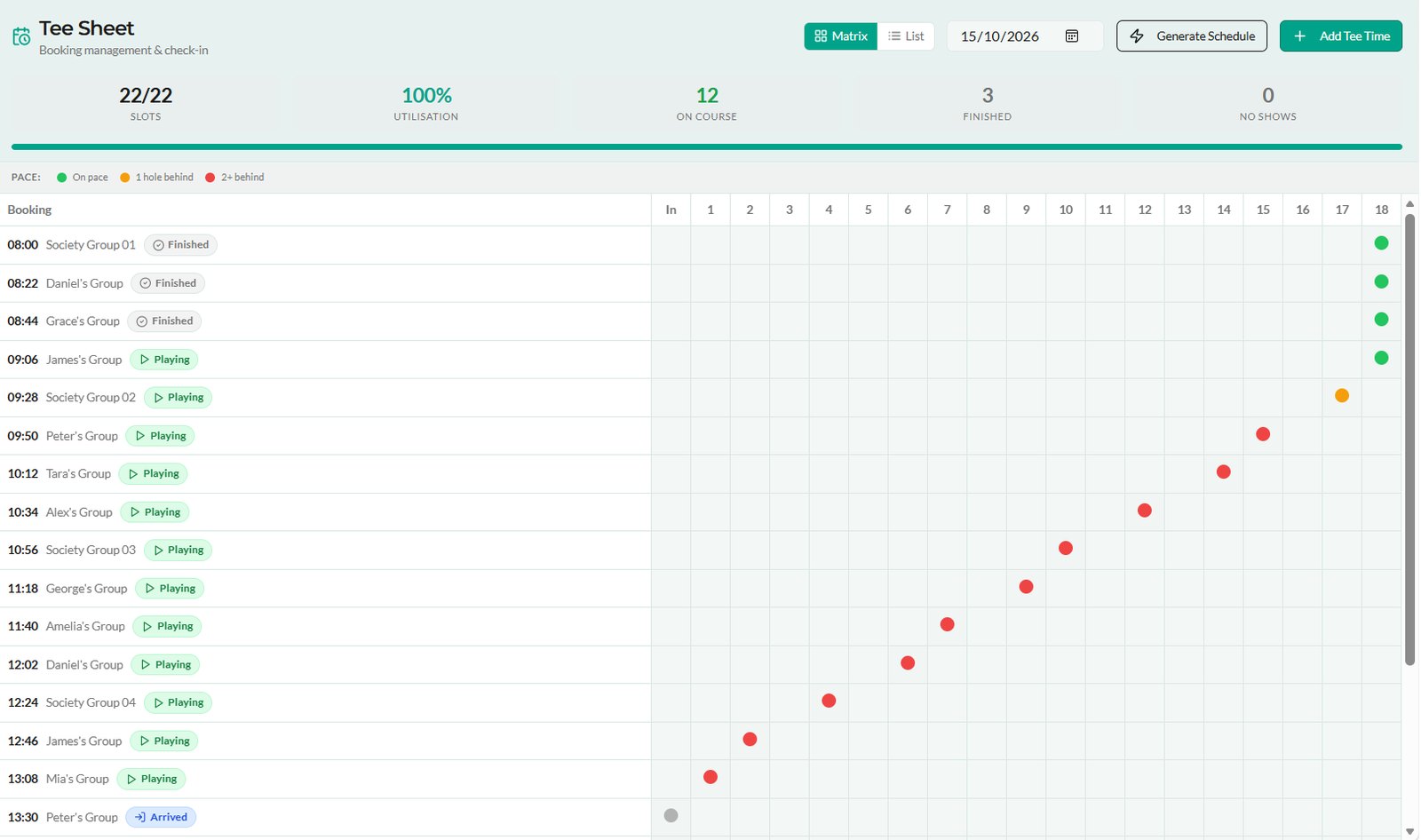
For marshals: spot slow play early
See every group on the course from one screen, spot the hold-up before the queue builds, and fix it with a quick message instead of a buggy ride. Your marshals spend less time chasing and more time helping, and your members get the smooth round they came for.

For golfers: check in, then play your way
Checking in is the only step a golfer has to take. One scan puts them on the course for the marshal. Recording the round, scoring, stats and sharing are all there for the golfers who want them.
Check in
Scan the QR code at the clubhouse. Then either forget about it and enjoy your round, or use the app as much as you like.
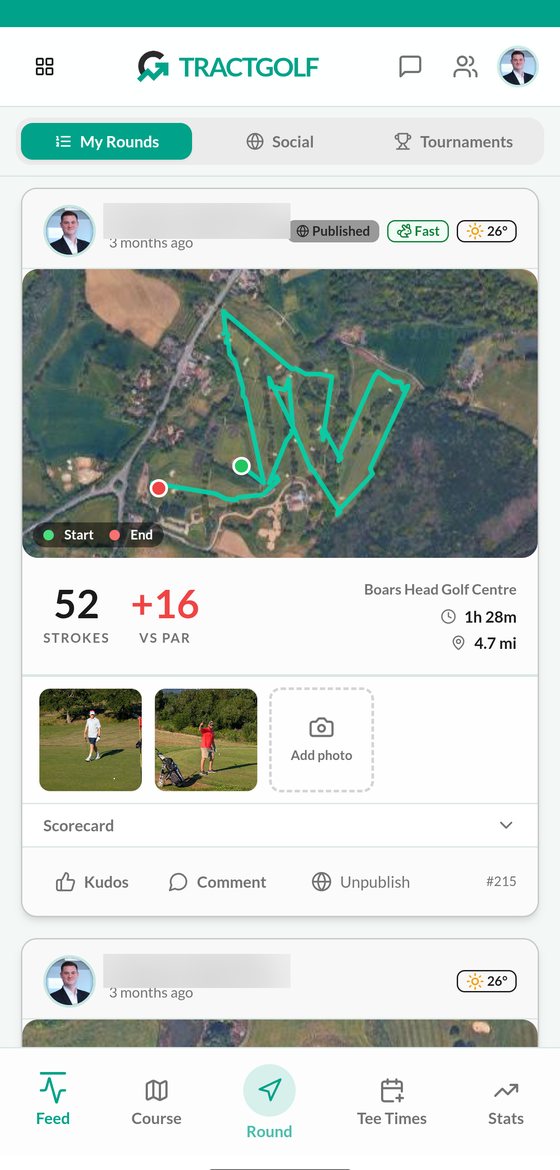
Record your rounds
A GPS route, score, time and distance for every round, with photos, kudos and comments.
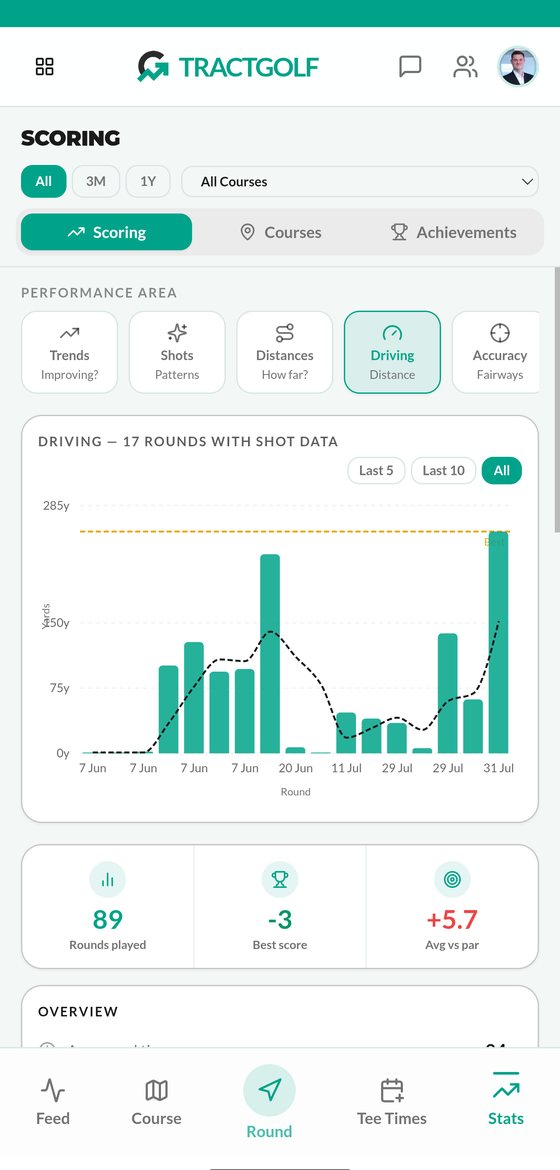
Track your game
Driving distance, scoring trends and accuracy from the shots you log.
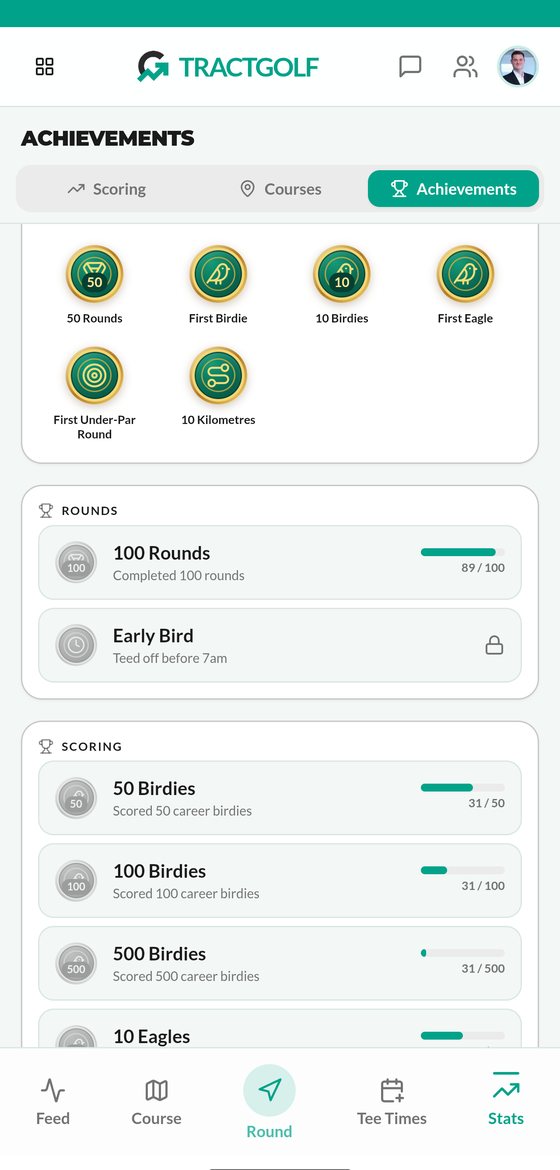
Earn trophies
Achievements unlock as you play, from your first birdie to 100 rounds.
Know when it's safe to hit
On blind holes and doglegs you often can't see the group in front. Because checked-in players are visible, the app shows how far ahead they are in yards, so you can wait until they're out of range instead of guessing.
Try it: set your longest drive and watch the group ahead walk down a 400-yard par 4. The verdict adds a 20-yard safety margin.
See the marshal app in action
A quick walk through the marshal app: the live map, course flow, tournament leaderboard and player chat.
Compete together, live
Turn any round into a competition. Golfers join a tournament or a friends' leaderboard with a short code, then follow every score as it happens, from the course to the clubhouse TV.
- Join with a codeClubs set up Strokeplay or Stableford events with a handicap allowance. Golfers join by entering the invite code in the app.
- Live scores across groupsScores update hole by hole, so you can see how your friends in other groups are getting on while you play.
- Leaderboards with friendsStart an open or private leaderboard for your society or regular group, and keep it running all season.
- On the clubhouse TVA shareable link puts today's leaderboard and a live player map on any screen. No account needed to watch.
Today's leaderboard
Live| Pos | Player | Thru | Net pts |
|---|---|---|---|
| 1 | Amelia B. | 18 | 37 |
| 2 | Grace L. | 18 | 36 |
| 3 | Mia B. | 17 | 32 |
| 4 | Daniel G. | 18 | 31 |
| 5 | James Q. | 18 | 31 |
Example layout with demo names.
Three roles, one platform
Golfers, marshals and club administrators each get the tools for their job, scoped to the right course.

Golfers
A mobile app that installs to the home screen.
- Find and book
- Browse courses by county, check weather and busyness, book with friends and guests.
- Record the round
- GPS route, elapsed time and distance, with pause, resume and recovery.
- On-course map
- Current hole, distance to the green and tap-to-measure.
- Group ahead
- See how far the group in front is, in yards, before you hit.
- Chat with the marshal
- Report a problem or reply to the marshal from the course.
- Score and shots
- Hole-by-hole strokes, shot types and trails, group and guest scoring.
- Compete
- Tournaments by invite code, plus open and private leaderboards.
- Stats and social
- Scoring and driving trends, trophies, friends, messages and an activity feed.

Marshals
An operations console for the course team.
- Live dashboard
- Every player on the course, checked in or online, with GPS freshness.
- Pace of play
- Course flow, hole timings, bottleneck heatmaps and slow-group alerts. Message a slow group, hold them at the turn, let groups play through, or start new groups on the 10th.
- Tee sheet
- Add or generate tee times, manage groups, walk-ins, carts and no-shows.
- Two-way chat
- Chat with any checked-in golfer, or broadcast to the course or a tournament field.
- Incidents
- Log, review and resolve incidents on the course.
- Replay
- Scrub back through any day to see where play stalled.

Clubs
Setup, access and rehearsal tools for administrators.
- Course mapping
- Draw or import tees, fairways, greens and bunkers, then publish holes.
- Tournaments
- Strokeplay or Stableford, handicap allowance and a live leaderboard.
- Users and roles
- Assign marshals to courses and manage golfer and staff accounts.
- Booking connections
- Link an external booking system through a generic REST adapter.
- Clubhouse TV
- Share or regenerate the public leaderboard link.
- Demo Day
- Rehearse a simulated day with slow-group scenarios, kept apart from real data.
Complex course scenarios, made easy
We've built a small simulation to show how the real solution works on a busy day. Try it yourself: play the marshal and decide how to handle a slow group, or switch to a golfer and see it from their side.
This illustration shows the idea behind TractGolf on a simulated 18-hole course. It is not the app itself. See the real marshal screens and the player app below. Hover a group to see where it is.
FAQs
Answers for clubs and golfers.
For golfers
Do golfers need to download an app?
No, you don't have to. The player app runs in the phone's web browser, and you can add it to your home screen so it opens like any other app. If you want more reliable GPS tracking during your round, you can also download the app.
Do golfers have to use the app to play?
The only thing a golfer has to do is check in by scanning the QR code. Recording the round, scoring, stats and sharing are all optional.
I've forgotten my phone, or I don't have one. What are my options?
The marshal can add you to TractGolf manually. If you are playing with golfers who have phones, you can be linked to their group. If not, and your course offers GPS trackers, the club may give you one to carry during your round.
Who can see where I am on the course?
Your position is only shown while you are checked in at the course. The marshal can see you, and so can other checked-in golfers. Checking out removes you from the map.
If I forget to check out, will I still be tracked?
No. Each course has a geofence around it that switches GPS recording off automatically. Even if you forget to check out, recording stops as soon as you leave the course.
I don't want other golfers to see all my details. What are my options?
You choose what other golfers see in your app settings. You can be anonymous, show just your initials, or show your full details. Nobody outside the course can see any player information. The marshal can still see who you are.
Can golfers pay online?
Yes, once online card payments are set up with Stripe. Golfers can also choose to pay at the course.
Is the handicap information official?
No. Handicap figures in the app are a guide for casual play and leaderboards, not an official handicap service.
For marshals and clubs
What does the club need to set up?
A map of the course (tees, fairways, greens and hazards), a check-in QR code and accounts for your marshals. Course outlines can be imported to give you a head start, then checked and published.
Can we try it before going live?
Yes. Demo Day runs a full simulated day on your course map, with slow-group scenarios, so your team can practise before any real golfer checks in. It never creates real rounds or GPS records.
Does it work with our booking system?
TractGolf has its own tee sheet and booking. It can also link to an external booking system through a standard connection, which needs a compatible, configured setup. We will check yours during the demo.
What does a marshal need?
Just a device with a web browser and a marshal account. Club administrators assign marshals to the course.
How accurate is the GPS?
It depends on the phone and needs location permission. Distances and hole information are only as good as the club's published course map, and some phones limit location updates when the app is in the background.
See it onyour course.
We can set up a Demo Day for your club, so your team can watch a simulated day before any real golfer opens the app.